Animation is about showing change between pictures or positions. Children can begin by moving pencil marks on paper before any screen or animation software is introduced.
Use: Home or classroom · Devices: Not required to start · Reader: Parent, teacher or adult guide
Project 1: make a bouncing-ball flipbook
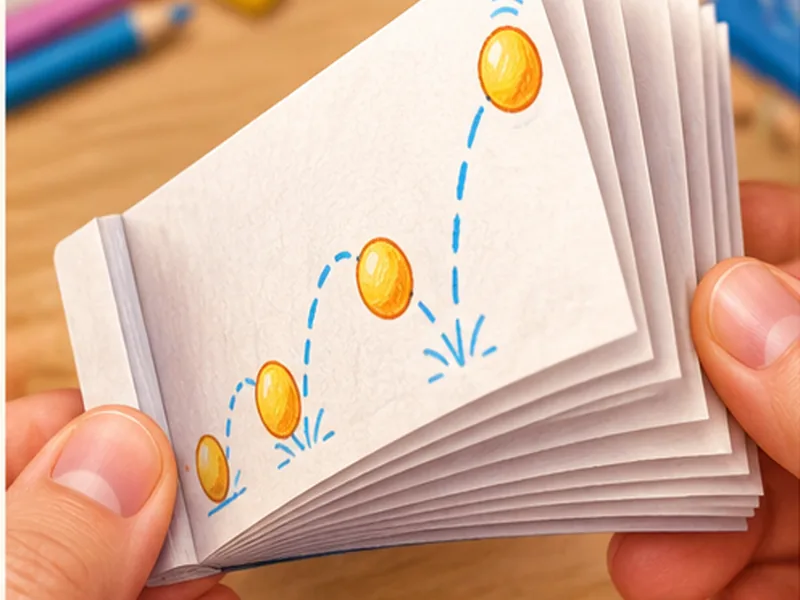
Ages: Around 7+. Draw a ball on the first of eight small sheets. Move it slightly to the right on each new sheet and lower it toward the middle, then lift it again. Stack the sheets and flip the edge. The ball should seem to move because each picture changes a little.
If it jumps suddenly, examine the frames side by side. Adjust one frame rather than drawing the whole book again. See the full flipbook activity.
Project 2: animate a paper character without an app
Ages: Around 6+. Cut a large paper character with an adult, then mark three positions on a sheet: standing, waving and walking. Move the character between marks while another family member calls out each position. This is a rehearsal for frame-by-frame animation.
Project 3: storyboard a 10-second scene
Ages: Around 8+. Draw beginning, problem and ending in three boxes. Give each scene a rough duration. Read the story aloud and check whether the audience can follow what changed. Use a three-scene storyboard as a reference.
Project 4: optional stop motion with adult help
Ages: Around 9+. Keep a phone or camera fixed with adult help. Take a photo, move a paper character a small amount, then take another. Repeat for 12–20 frames. Preview privately in an age-appropriate app. Avoid publishing names, faces or locations.
If no device is available, create a 12-panel paper strip showing the same movement. The planning and sequencing are still meaningful.
What to learn next
A hobby class can introduce timing, character design, feedback and a more consistent workflow, but parents should ask the academy which animation activities are suitable for their child and whether devices are required.
Questions parents and teachers ask
Can kids learn animation without a computer?
Yes. Flipbooks, changing drawings and three-scene storyboards teach sequencing and motion concepts without digital devices.
What is a simple first animation project?
A bouncing ball is a manageable first project because the shape stays the same while the position changes.
Enjoyed the activity? Explore guided hobby learning.
Free projects are a useful starting point. If your child enjoys practising, Arts Film Academy publishes hobby options in drawing, digital art, animation and coding. Ask the academy about actual class availability, child suitability, teaching approach, sample projects and fees before enrolling.
Explore hobby-class options →Visit Arts Film Academy ↗
Adult enquiries only. AtFunky does not promise higher marks, IQ gains, professional qualifications or future jobs.
Activity ages are approximate and should be adapted to the child. Adult supervision is required where tools, small parts or public settings are involved. Teaching outcomes depend on the activity and guidance, not on a promised score or profession.