Coding begins with giving instructions, checking what happens and fixing mistakes. Try these games with paper, arrows and household objects before using any app. An adult should play the robot exactly as instructed—even if the directions are incomplete.
Game 1: Robot path on a grid
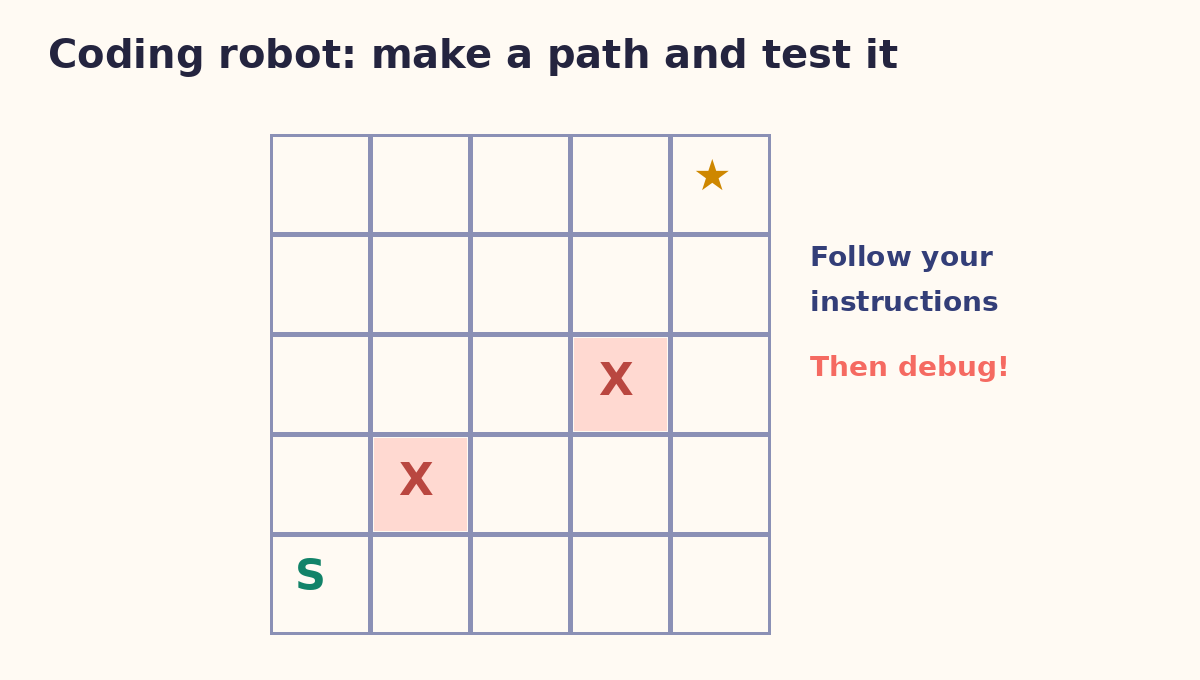
Prepare: Draw a 5×5 grid. Put S at the bottom-left and a star in the top-right. Mark two squares as obstacles.
Play: A child writes a sequence such as up, up, right. The adult follows exactly one square at a time. If the robot hits an obstacle, the child edits the sequence.
Practise: Sequencing and debugging. Younger children can use a 3×3 grid.
Game 2: Find the bug
Prepare: Write: draw one circle, draw two legs, add a smile, add two eyes. Deliberately put “add the ears” before “draw the head” in a second version.
Play: Give the instructions to a partner and compare the results. Discuss which sequence needs fixing and which steps may be done in any order.
Practise: Testing instructions and explaining a correction.
Game 3: Repeat the pattern (loops)
Prepare: Lay out red-blue-red-blue blocks or pencil marks.
Play: Ask the child to write a shorter rule: “repeat red then blue four times.” Change a block and test whether the rule still fits.
Practise: Patterns and repetition. Connect this to multiplication by repeated groups.
Game 4: Sorting robot
Prepare: Gather nine clean cards with combinations of triangles/circles and red/blue marks.
Play: Invent a rule such as “put red triangles on the left; everything else on the right.” Test every card and discuss overlaps.
Practise: Classification, precise rules and edge cases.
Game 5: If-this-then-that actions
Prepare: Agree that if the adult holds up a circle, the child claps; if a square, the child steps; if neither, the child stays still.
Play: Show ten shapes in a random order. Pause and ask the child to state the rule. Reverse roles and add a third shape.
Practise: Conditionals, attention and making simple algorithms.
Parent and teacher notes
Ask learners to explain the rule in their own words, then let someone else test it. The mismatch between what was intended and what happened is the useful lesson.
Children should not be asked to share their locations, names or photos. For more activities, see AtFunky coding maze and the coding hobby introduction.
Download free A4 coding-game cards PDF →
Reference: Code.org offers additional educator-developed unplugged computing activities. The five games above are original AtFunky variations.
Enjoyed the activity? Explore guided hobby learning.
Free projects are a useful starting point. If your child enjoys practising, Arts Film Academy publishes hobby options in drawing, digital art, animation and coding. Ask the academy about actual class availability, child suitability, teaching approach, sample projects and fees before enrolling.
Explore hobby-class options →Visit Arts Film Academy ↗
Adult enquiries only. AtFunky does not promise higher marks, IQ gains, professional qualifications or future jobs.